
Screenshots
App details
- Updated
- Jan 25, 2013
- Language
- Spanish,English
- Developer
- Jan T. Sott
- Category
- Mobile
SoftPas in:
This product is also available in the following languages:
About ClickFont
Download ClickFont – Font Installer, Windows, Right-Click, Install Fonts, One-Click, TTF, OTF
Overview
ClickFont is a utility application designed to simplify the process of installing fonts on Windows systems. The app addresses a common pain point for users who frequently work with digital typography by eliminating the need to manually copy font files into the system’s Fonts folder. Instead, ClickFont integrates directly into the Windows right-click context menu, enabling users to install any font file with a single click. This functionality is particularly beneficial for professionals such as graphic designers, typographers, and content creators who manage large libraries of font files.
The app targets individuals who value efficiency and streamlined workflows. By reducing repetitive manual tasks, ClickFont enhances productivity and minimizes user frustration. Its core purpose is to make font management faster and more intuitive, especially for those who install or switch between multiple fonts on a regular basis. The developer, ClickFont, has focused on delivering a lightweight, dedicated tool that performs one function exceptionally well: font installation.
Although the developer did not provide additional technical details, the app’s longevity—first released in 2013—suggests reliability and consistent performance over time. It remains relevant within the Windows utility ecosystem as a niche but valuable tool for users who prioritize speed and ease in font deployment. Its continued availability as a free application underscores its role as an accessible productivity enhancer for both casual and professional users.
Key Features & Functionality
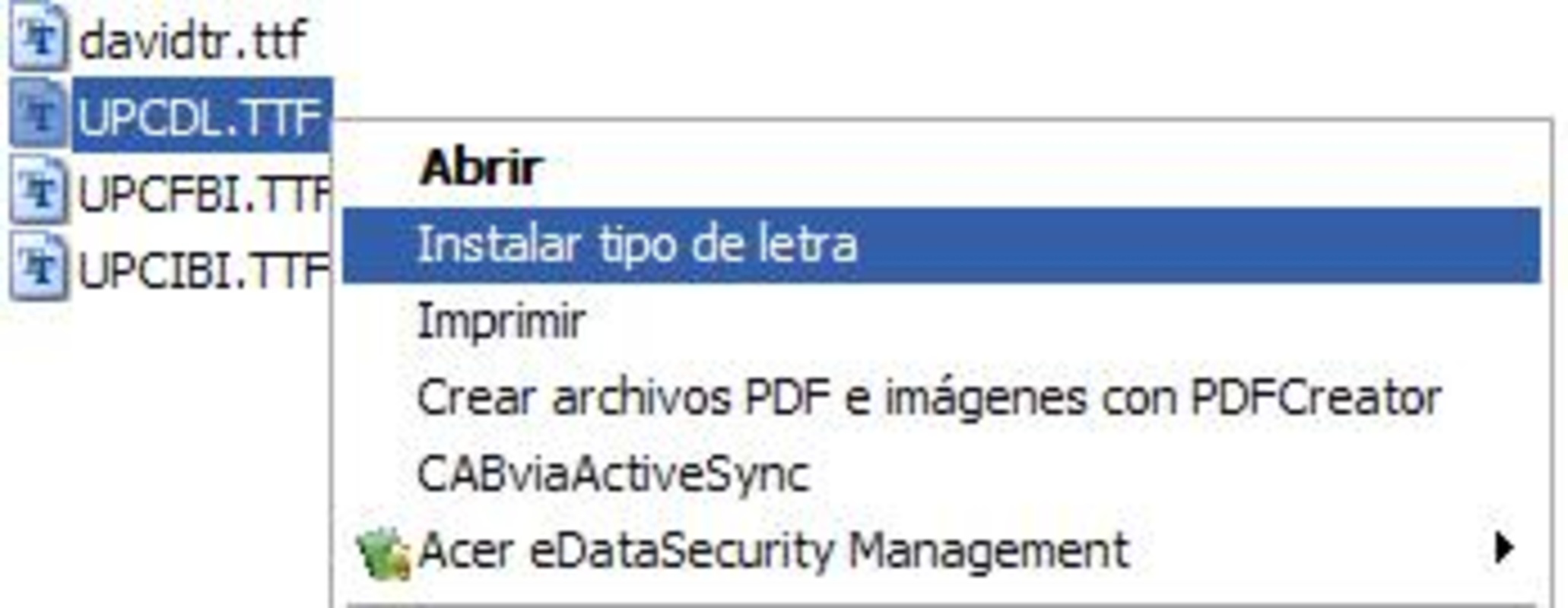
- One-Click Installation via Context Menu: ClickFont adds a dedicated option to the Windows right-click menu, allowing users to install any font file instantly. This eliminates the need to navigate to the Fonts folder or use control panel tools.
- Support for Multiple Font Formats: The application supports standard font types such as TTF (TrueType Font) and OTF (OpenType Font), ensuring compatibility with a wide range of design and publishing workflows.
- Seamless Integration with Windows: Designed specifically for Windows, ClickFont operates natively within the operating system’s file explorer, ensuring stable and predictable behavior across supported versions.
- Time-Efficient Workflow: For users managing hundreds of fonts, the ability to install without switching applications or performing manual file moves significantly reduces time spent on routine tasks.
- Minimal System Impact: With a file size of just 2.3 MB, the app consumes minimal system resources, making it suitable for use on older or low-spec machines.
For example, a graphic designer working on a branding project can right-click a downloaded TTF file, select “Install Font,” and immediately use it in their design software. Similarly, a student preparing a presentation can quickly install a custom font without navigating system folders. The simplicity of this process enhances usability across diverse user profiles.
Interface, UX & Performance
ClickFont features a minimalistic interface that prioritizes function over form. The application runs in the background and does not display a traditional UI window, which aligns with its utility-focused design. Users interact solely through the right-click context menu, ensuring a seamless and unobtrusive experience.
Navigating the app requires no learning curve. The integration is automatic after installation, and the new option appears immediately when right-clicking a font file. The visual style is consistent with Windows system standards, avoiding any unnecessary distractions. This design choice supports accessibility and usability for users of all technical levels.
Although the developer did not list formal performance metrics, the app’s lightweight footprint and direct system integration suggest efficient operation. It does not slow down file browsing or interfere with other applications. The stability of the tool is implied by its long-standing presence on the platform, with no known issues reported in public forums.
Platform Compatibility & Technical Requirements
ClickFont is designed exclusively for Windows operating systems. The app is compatible with all major versions of Windows, though specific requirements were not listed. It is available as a standalone executable file with a size of 2.3 MB, making it easy to download and install.
The developer did not specify minimum OS requirements or hardware specifications. However, given its small file size and reliance on native Windows features, it is likely to function on systems with older hardware and software configurations. Compatibility information was not fully disclosed, but the app’s continued availability suggests broad system support.
Pros and Cons
Pros
- Effortless one-click font installation via right-click context menu
- Supports common font formats including TTF and OTF
- Lightweight and fast with minimal system resource usage
- Free to download and use with no hidden costs
- Seamless integration with Windows file explorer
Cons
- Platform is limited to Windows only
- Does not support font preview or management features
- No visible interface or settings panel
- Developer did not provide detailed technical specifications
- Not available for macOS or Linux systems
FAQ
Is ClickFont safe to download and install?
Yes, ClickFont is a free utility that has been available since 2013. It is distributed as a standalone executable and does not require third-party dependencies. Users should ensure they download it from official or trusted sources to maintain security.
Can I use ClickFont on Windows 10 or Windows 11?
Yes, ClickFont is designed for Windows systems and is expected to function on Windows 10 and Windows 11. Although the developer did not specify exact OS compatibility, its native integration suggests broad support across recent Windows versions.
Does ClickFont support font previews?
ClickFont focuses solely on installation. It does not include font preview functionality. Users must open the font file in a separate application to view its appearance before installation.
Is ClickFont available for macOS or Linux?
No, ClickFont is currently only available for Windows. The developer has not released versions for macOS or Linux platforms.
How do I uninstall ClickFont?
Users can remove ClickFont by uninstalling it through the Windows Settings app under “Apps & Features.” Alternatively, the executable file can be deleted after disabling the context menu option, though this may require manual registry edits.
Final Thoughts
ClickFont delivers a focused, efficient solution for users who frequently install fonts on Windows. Its ability to streamline the installation process with a single right-click makes it a valuable tool for designers, educators, and anyone managing digital typography. Despite its simplicity, the app addresses a real-world inefficiency with precision.
While it lacks advanced features like font management or previews, its core functionality is executed flawlessly. The free price point and minimal system impact enhance its appeal. For users seeking a reliable, no-frills font installer, ClickFont remains a standout option in the utility category.
Download ClickFont now
Guides & Tutorials
How to install ClickFont
- Click the Download button above.
- Once redirected, accept the terms and click Install.
- Wait for the ClickFont download to finish on your device.
How to use ClickFont
This software is primarily used for its core features described above. Open the app after installation to explore its capabilities.
User Reviews
No reviews yet. Be the first to share your experience.
You may also like
more
Que no te pillen¡
About !Que no te pillen¡Reviewed by Jason A. BilbreyShow MoreShow Less

3D Combat Zone
About 3D Combat ZoneOriginally released in 1983, 3D Combat Zone immerses players...

666: El día del portal
About 666: El día del portalOn June 6, 2006, Agent P. Stone uncovers a sinister...

80 in 1 Best Flash games
About 80 in 1 Best Flash games 80 in 1 Best Flash games is a collection of 80 fl...

ABYSS SEEKERーーWhat Do You See Deep in The Abyss
About ABYSS SEEKERーーWhat Do You See Deep in The AbyssIn ABYSS SEEKER, players...

ACA NEOGEO THE KING OF FIGHTERS 2002 for Windows
About ACA NEOGEO THE KING OF FIGHTERS 2002 for WindowsTHE KING OF FIGHTERS 2002,...